Repairable
Active member
820-2915
No chime, black screen,
But i have green light and fan spin
System is brainless like louis says, meaning no vcore
please dont tell the direct answer, but just kick me in the right direction
Ppbus_g3h 12.56v
PPVIN_S5_HS_COMPUTING_ISNS 12.56v
PPVIN_S5_HS_GPU_ISNS 12.56v
PPVIN_S5_HS_OTHER_ISNS 12.56v
PPDCIN_G3H 18.72v
PP3V42_G3H 3.46v
PPVRTC_G3H 3.3v
PP5V_S5 5v
PP5V_SUS 4.99v
PP5V_S3 5v
PP5V_S0 5v
PP3V3_S4 3.336v
PP3V3_SUS 3.3v
PP3V3_S5 3.3v
PP3V3_S3 3.3v
PP3V3_S0 3.3v
Skipping T29 rails,
PP1V8_S0 1.79v
PP1V8_S0_CPU_VCCPLL_R 1.784v
PP1V5_S3 1.5v
PP1V5_S3RS0_CPUDDR 1.5v
PP1V5_S0 1.51v
PPVTTDDR_S3 0.75v
PP0V75_S0_DDRVTT 0.75v
PP1V2_S0 1.21v
PP1V05_SUS 1.032v
PP1V05_S0 1.043v
Skipped backlight, no screen attached atm, and also no chime.
PP3V3_ENET 3.3v
PP1V2_ENET 1.2v
PP3V3_S0GPU 3.3v
PP1V8_GPUIFPX 1.7v at moment of probing 0v resistance 0.282
PP1V8_S0GPU_ISNS 1.78v
PP1V5_GPU_REG 1.5v
PP1V5_S0GPU_ISNS 1.5v
PP1V0_S0GPU 1.01v
PP1V0_S0GPU_ISNS 1.00v
Finaly vcore. Here is where the trouble should begin, according to Louis. I don’t know why lets hope I find out in the future
PPVCORE_GPU 1.11v
PPVCORE_S0_CPU 1.15v
PPVCORE_S0_AXG 0v Alarm bel....
(measured resistance but it’s the same as ppvcore_so_cpu 0.0002, but there comes 1.15v here nothing)
Oke going back to the pdf,
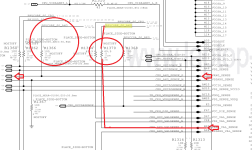
no stuff on R1370
no stuff on R1366
ok now I see this is out going lines not in, this means imo this only turns on after cpu turns on, damn
see attached picture for my thought on this.
Oke after going true the pdf again, I come across AXG PHASE that seems to create PPVCORE_S0_AXG
0.000v on both sides of L7550
PPVIN_S5_HS_COMPUTING_ISNS is present checked that before
Pin 1 12,56v 0.408
Pin 2 0v 0.408
Pin 3 0v 0.0003
Pin 4 0v 0.466
Pin 5 0v 0.0002
Pin 6 0v 0.0002
Pin 7 0v 0.00002
Pin 8 gnd
R7556 4.76v
R7555 0.003v 0.648 on rail
Lost completely.
Going true the pdf, I found cpuvcore enable, damn stupid.
All_sys_pwrgd 3.356v
CPUIMVP_VR_ON 3.356v
PM_PECI_PWRGD 3.356v
No chime, black screen,
But i have green light and fan spin
System is brainless like louis says, meaning no vcore
please dont tell the direct answer, but just kick me in the right direction
Ppbus_g3h 12.56v
PPVIN_S5_HS_COMPUTING_ISNS 12.56v
PPVIN_S5_HS_GPU_ISNS 12.56v
PPVIN_S5_HS_OTHER_ISNS 12.56v
PPDCIN_G3H 18.72v
PP3V42_G3H 3.46v
PPVRTC_G3H 3.3v
PP5V_S5 5v
PP5V_SUS 4.99v
PP5V_S3 5v
PP5V_S0 5v
PP3V3_S4 3.336v
PP3V3_SUS 3.3v
PP3V3_S5 3.3v
PP3V3_S3 3.3v
PP3V3_S0 3.3v
Skipping T29 rails,
PP1V8_S0 1.79v
PP1V8_S0_CPU_VCCPLL_R 1.784v
PP1V5_S3 1.5v
PP1V5_S3RS0_CPUDDR 1.5v
PP1V5_S0 1.51v
PPVTTDDR_S3 0.75v
PP0V75_S0_DDRVTT 0.75v
PP1V2_S0 1.21v
PP1V05_SUS 1.032v
PP1V05_S0 1.043v
Skipped backlight, no screen attached atm, and also no chime.
PP3V3_ENET 3.3v
PP1V2_ENET 1.2v
PP3V3_S0GPU 3.3v
PP1V8_GPUIFPX 1.7v at moment of probing 0v resistance 0.282
PP1V8_S0GPU_ISNS 1.78v
PP1V5_GPU_REG 1.5v
PP1V5_S0GPU_ISNS 1.5v
PP1V0_S0GPU 1.01v
PP1V0_S0GPU_ISNS 1.00v
Finaly vcore. Here is where the trouble should begin, according to Louis. I don’t know why lets hope I find out in the future
PPVCORE_GPU 1.11v
PPVCORE_S0_CPU 1.15v
PPVCORE_S0_AXG 0v Alarm bel....
(measured resistance but it’s the same as ppvcore_so_cpu 0.0002, but there comes 1.15v here nothing)
Oke going back to the pdf,
no stuff on R1370
no stuff on R1366
ok now I see this is out going lines not in, this means imo this only turns on after cpu turns on, damn
see attached picture for my thought on this.
Oke after going true the pdf again, I come across AXG PHASE that seems to create PPVCORE_S0_AXG
0.000v on both sides of L7550
PPVIN_S5_HS_COMPUTING_ISNS is present checked that before
Pin 1 12,56v 0.408
Pin 2 0v 0.408
Pin 3 0v 0.0003
Pin 4 0v 0.466
Pin 5 0v 0.0002
Pin 6 0v 0.0002
Pin 7 0v 0.00002
Pin 8 gnd
R7556 4.76v
R7555 0.003v 0.648 on rail
Lost completely.
Going true the pdf, I found cpuvcore enable, damn stupid.
All_sys_pwrgd 3.356v
CPUIMVP_VR_ON 3.356v
PM_PECI_PWRGD 3.356v