For $29/mo, we provide access to advanced level technicians who will answer your questions on any Macbook board related matter to the best of their knowledge promptly & walk you through how to solve your problem so you can deliver a working board to your customer.
Yea I know but I have already checked for knocked off components and broken traces and I did not find anything. I have a Crest ultrasonic cleaner that I use all the time without any issues, so I don't think the UC would have broken any traces.
I got around to finally replacing the PCH on this board and now I have got CPU Vcore back but its stuck at 1.1v and no GPU Vcore voltages. Is it safe to remove UA600 from the board and try and turn it on without this chip just for test, or would that cause some kind of damage?
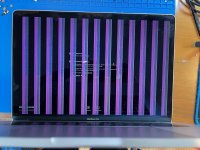
Yea I figured that was not a good idea, which is why I asked first. I replaced UA600 one last time with a new one and then I put the board through the ultrasonic cleaner again because it was covered in flux and then let it dry over night. To my surprise, now it is turning on a gives me an image on the screen but it has vertical pink and green lines across the screen. I tried a clean ME bios and PRAM reset, since I replaced the PCH, but that did not fix the issue. Diagnostic reports no issues found, but if I try to boot to the internal SSD, it loads halfway and then kernel panics. If I try to boot to a external copy of macOS, it looks like it fully boots because the keyboard backlight and touchbar become active and work, but the screen still shows an apple logo with the progress bar stuck. I had a board like this a while ago and I actually fixed it by replacing the GPU VRAM chips. Is there a way I can figure out if its the GPU VRAM or the GPU itself that is bad?