

HeyWatchOutDude
Member
Hi,
I have a MacBook Air M2 (13” / 820-02536 / A2681) that is stuck at 5V.
It had water damage in the following areas:
Notes:
What should I check next?
I have a MacBook Air M2 (13” / 820-02536 / A2681) that is stuck at 5V.
It had water damage in the following areas:
- F5200 was blown and has been replaced.
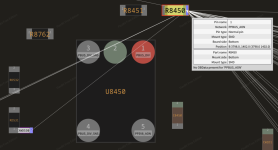
- R8450 (pin 1 / PPBUS_AON): the pad was missing. After restoring the pad, PPBUS_AON could not be measured there for some reason, so I ran a wire from F5200 (pin 2 / PPBUS_AON) to R8450 (pin 1). PPBUS_AON can now be measured there and at RD531/XWD530 (pin 1).
- PPVBAT_AON_CONN was shorted to ground; the short has been removed and now measures 1.106 in diode mode.
Notes:
- PPBUS_AON is not stable. When F5200 is removed, PPVBAT_AON_CHGR_REG is stable.
- U5200 has already been replaced, with the same behavior.
What should I check next?
