820-2915-A missing LCD_PWR_EN - external monitor OK

george-a

Member
Hi guys,

I got a similar issue with this thread: https://www.rossmanngroup.com/board...oting/10654-820-2915-missing-lcd-power-enable

This is is the hi-res LCD model which is missing LCD_PWR_EN.

We have the following going on:

1) There is picture on external monitor, it boots to OS but at the end the desktop is not shown - the external monitor goes dark (is this normal or a resolution issue? the monitor has a native res of 1440 x 900)
2) C9010 has 3,4V and R9010 and R9011 measure 94K and have also 3,4V being pull-ups.
3) SMC_LID is high at pin8 of J6955
4) Pin 6,7 in diode mode are at .450 (approx)
5) Can't measure continuity at the end of the cable since the LCD is sealed

Could it be anything else other than the connector? The customer says nobody tried other LVDS cable or LCD.

br,
george
 

george-a

Member
I will try to find an LCD assembly. GPU is known to be good since it was replaced with new BGA using Fineplacer PICO RS system and was probably the 1xxxth I have done so far - a job where we provide 12 months warranty - only reason I mention this is that for me this is now a routine operation with almost 0% failure rate..

So my money is on something else taking into account that after replacing the GPU there is no change - and the GPU was replaced since the customer claimed the LCD is working. But as House says, everybody lies and now the customer after some pressure changed his point to "not 100% sure if it was working I had this machine on a shelf for months".

How about the MUX? I know its the culprit sometimes (for green lines) in 2850 but could it fail here, too?
 

jgraffis

New member
have you checked voltage on R9678? usually when i see this there isn't voltage here and a reflow/reball needs to be done on the mux. Not this doesn't always fix the issue, but then again I'm not reading and flashing chips yet. if thats even possible on the mux chip.
 

george-a

Member
So this came for GPU replacement and you did not check if there was an image?

that came with different symptom - it started normally and then slowed down after sometime (what the customer said at the very beginning) - I did rush a little to be honest and without using ASD I replaced the BIOS with one that I personally cleaned the ME Region retaining the original serial numbers. I did that immediately after receiving it so I did not confirm it. I also checked the dump I took from the BIOS chip and it looked messed up - the serials where found at different offset than expected.

anyway with the new EFI and CleanME it starts, chimes, and no image internally. There is image on the external monitor but only during booting. Fan speeds, voltages etc are normal.

jgraffis I will test R9678. Thanks dude.
 

george-a

Member
I did with clear me but didnt work. should I try the original dump (unedited with clear me)? or should I get a dump from the guys here that we know it works for 820-2915-A with hi-res LCD?
 

george-a

Member
OK you were right about the original EFI file - I put it back and I am back to square 1. I have now to see why this machine slows down after a while.

During the other attempts so far this customer gets a GPU reball in the package which he was gonna need anyway sooner or later. Still cant comprehend why other EFI dumps did not work.

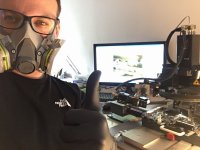
I also attached a picture of the reballing king in front of his killer rework machine :D - for you viewing pleasure.

cheers dude - Ill come back with the true issue after I run some diagnostics.
 

Attachments

  • File_000 (2).jpeg
    File_000 (2).jpeg
    1.7 MB · Views: 0

dukefawks

Administrator
Reballing is BS and you are scamming the customer. The problem is ALWAYS inside the chip and cannot be fixed with reballing. Wasting time.....
 

george-a

Member
that's not statistically (at least) true - we know reflows last a couple of months (sometimes less sometimes more but you can't tell) and reballing jobs - we usually forget about them. As I said during the 1 year warranty we offer, IF the GPU fails again then we replace the chip with only the cost of the chip itself. I would like to see some X-rays before we can be sure of anything. As engineers if we can't measure or prove we observe but if we can measure then that is indisputable and to check ball joints you use X-rays. Otherwise its mostly speculation.

at the end of the day lets agree that we disagree and also take into account that almost NOBODY is using Finetech's systems for GPU repair. Remember that such rework machines are used in the factory post production of reputable companies (big names you'd definetely recognise)

final note - if I was scamming anyone I would definitely have a long queue of unhappy people outside. That's not the case. They tend to recommend us to others. And we bought the rework system 5 years ago.

now maybe we could focus on that stupid mbp15 - in case you have some ideas or should I just return it?
 

dukefawks

Administrator
Any reballed GPU will return. The ones that didn't return the customer just didn't bother or they sold it. Only chips that can be reballed are CPUs/NB/SB and small BGA stuff. Any big flip-chip BGA that has lots of heat cycles will fail internally.

No idea why it goes slow. Boot it externally and run ASD on loop to check sensor errors. Battery can also cause issues like this.
 

george-a

Member
again you are speculating or projecting - X-rays can only tell for sure. Also what is different in CPU/NB/SB production when it comes to attaching the DIE to the SUBSTRATE that they are not similarly susceptible to failing as their GPU "cousins"? Maybe you are right about customers not bothering - but as I said - we offer 1 year warranty. And out of the so many reballs we do during that time, surely some should be coming back. And they do but its less that 5-10% - and for those we replace the chip.

thanks for the input , I will try without battery first, then do the loops. Is there a chance its the RAM or the SSD?
 

nate8organic

New member
OK you were right about the original EFI file - I put it back and I am back to square 1. I have now to see why this machine slows down after a while.

During the other attempts so far this customer gets a GPU reball in the package which he was gonna need anyway sooner or later. Still cant comprehend why other EFI dumps did not work.

I also attached a picture of the reballing king in front of his killer rework machine :D - for you viewing pleasure.

cheers dude - Ill come back with the true issue after I run some diagnostics.

Can i ask why your tech has a mask on and not a proper carbon scrubber setup in that room? seems pretty half ass for a guy using a $70,000 rework station..
 
Top