820-00138-A PP1V35_S3_MEM short to ground

dudipupan

Member
Hello everybody,
actually i'm working on a 2015 MacBook pro 15" (820-00138-A) that is not powering on.
I detected PP1V35_S3_MEM is shorted to ground but i struggle in locating the short circuit.
I inserted 1.35V to Pin 2 of R5560 but here all memory chips are getting warm.
There are about 200 caps that could cause the short - or one of the 32 memory chips.
Has anybody an idea how to locate the faulty component?

Thank you and best regards
 

dudipupan

Member
Unfortunately I'm not owning one and I don't know anybody who ownes one :-(
Already tried it with Isopropanol but i'm not getting any clear result.
 

2informaticos

Administrator
Staff member
You can try that.
If still the same, then remove RAM chips 2-3 at a time.
You may have luck and eliminate the short fastest.
 

dudipupan

Member
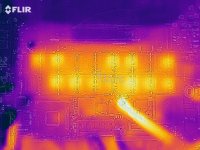
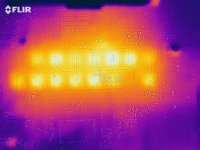
I managed to get a IR-camera and took a closer look on the RAM chips.
The picture is a little bit misaligned so the thermal image is moved to the right.
As feared I see no temperature peak here. But some of the chips are not getting warm at all.
Any assessment?


2flir_20210104T160730.jpg2flir_20210104T160753.jpg
 

dudipupan

Member
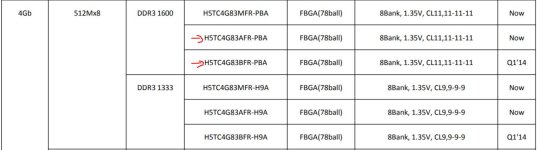
So the second one i marked with a red arrow are the faulty ones from the original board (H5TC4G83AFR-PBA) and the first marked is the chip model from the donor board.
Should be fine?

Unbenannt.JPG
 

dudipupan

Member
So just reballed 32 RAM chips... :-D
Should I check the RAM power supply voltage before soldering them back on? I'm afraid burning the new ones :-D
 

2informaticos

Administrator
Staff member
The only reason to burn so many RAM chips, is a severe voltage spike.
That could also damaged CPU already; is connected to the same voltage rail.

If you want to continue/waste time on it, check the RAM voltage before soldering new chips...
 

dudipupan

Member
I just spent so much time for this so I will try it ;-)
At least I got a fanspin now (without RAM). Is there a possibility to check if the CPU is working before soldering the RAM? I dont think so :-D
 

dudipupan

Member
I soldered the memory chips back on. Only got fan spin - no display and no usb activity. So I think you were right and the cpu is gone ?
 
Top