Macbook Pro A2159 820-01598

Instafixx

Active member
Machine switches on.
Question Mark Folder.
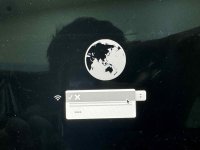
Command + R leads to internet recovery but No Wifi Networks Showing.
The Globe spins with Choose network option that wont show any wifi

Board is clean.
Little Green around U7100 . Cleaned it. All points have proper diode mode readings.
 
Last edited:
I connected a External LAN Cable and Tried Flashing from a USB.
Succefully went into recovery.
SSD is visible as "Uniniated" ( The customer himself had tried doing recovery)
Wifi is also working in this menu.

I tried Re-Installing the os but the startup security wants me to press command+r and then do it.
And when doing Command + r i am unable to move forward because of the spinning globe with no wifi.

Did a succesful DFU Restore. Still the same.

Also did a NVRAM Reset.
 
Last edited:
my bootable installer is High Sierra.
Since this was launched with Catalina - can that be a reason its going to Internet Recovery?

Also its Flashing a Question Mark folder. It will not go into Safe Mode.
 
Last edited:
Tried Safe Mode. Stuck in Apple Logo.
Apple has stopped making thunderbolt to Ethernet adapters.
Any third party brand adapter that is known to work in system recovery ?
 
With Board on Desk. The Ampere settles at .250A.

Checked the board.
PP0v95_S0_CPUVCCIO_REG_R is Present
PVCCIO_EN signal at R8165 is Present
PPVCCEDRAMS0_EN_FILT_BUF signal at R7766 is Missing
Diode Mode to Ground is .543.

Resistance Across Pins at R7766 is 40k Ohms.
 
I think EDRAM voltage is not present so early as normal.
You should confirm with good board.

Just in case, check what happens installing Windows, or Linux.
 
I do not have another board but as per the article at Repair.Wiki EDRAM voltage should be present. Any wild guess ?

It has some hardware issue for sure.
Tried installing windows from a bootable USB.
Machine again stuck at Apple Logo.

Thermal Camera shows U2800 getting hot - Have removed the shield.
 
Last edited:
Replacement Done.
This one heats up too.

Same Issue

Will this work without that chip.

Without U2800. Y3000 gets mildly warm. Goes upto 37 Degree Celcius.
 
Last edited:
You will lose USB communication once macOS starts loading.
But you can try without U2800; should boot at least.
 
I tried without U2800.
Its the same situation. Booting with the same error.

I guess will have to return.
 
I just saw it once when somehow by ethernet i entered the Recovery OS.
I formatted the Disk via Disk Utility and connected the wifi too.
The re-install process got interrupted and it rebooted.

After that i was never able to enter the Recovery OS even with ethernet.
 
Back
Top