820-00165 Charging Issue

Hope you can help. I have a 2015 MacBook air with the 820-00165-A board. The issue I'm having is the battery will not charge. Computer runs fine on wall adapter and the computer sees the battery. I tried another battery with the same result. I'm a bit new at this but catch on fast. I already have the board view for this board and have started troubleshooting.

PPBUS_G3H is 8.4v so I assume Q7155 is the issue. Is there a way for me to test Q7155? Anything else I should be checking?

Additionally I am using coconutBattery to see the Charging info. When I first attach the charger it shows charging at 10 watts then gradually drops to 0 watts.

Any help would be great.

Thanks
 
Any history available?
Post voltage for U7100, pins 9, 15, 26.
Measure onboard exact value (ohm scale) for R7180/81 and R7185/86.
Do you get amber light when charger is connected?
Do you have original Apple 60/85W charger, MagSafe 2 model?

OSX shows some message like Replace/Service now for battery?
 
"Amber light shows on charger even with battery unplugged"
Normal behaviour. MagSafe light will switch back to green only if battery is 100% charged.

Try another charger, 60/85W if possible.

"Pin 26 - 14.59v"
Should be 0V in normal mode.

"Pin 15 - 8.56v"
Really???
Check again that...
 
"Amber light shows on charger even with battery unplugged"
Normal behaviour. MagSafe light will switch back to green only if battery is 100% charged.

Try another charger, 60/85W if possible.

"Pin 26 - 14.59v"
Should be 0V in normal mode.

"Pin 15 - 8.56v"
Really???
Check again that...

I'll check again when I get home from work today.
 
"Amber light shows on charger even with battery unplugged"
Normal behaviour. MagSafe light will switch back to green only if battery is 100% charged.

Try another charger, 60/85W if possible.

"Pin 26 - 14.59v"
Should be 0V in normal mode.

"Pin 15 - 8.56v"
Really???
Check again that...

I just cleaned up the area again.

Pin 26 is 0
Pin 15 also 0 now
 
Well I guess I am going to try reflowing the chip. After cleaning it good with alcohol I am now successfully charging the battery BUT only charging at 1.84 watts. I assume there is additional corrosion that I cannot see.
 
Give time to fully charge it and take a look to the time reported.
Post again pin 9 & 15 voltage.

Please, do NOT quote an entire post from few cm above; is not aesthetic...
 
I double checked. This thing seems to act differently Everytime power is applied as far as u7100 goes

Pin 9 - 3.4v
Pin 15 - .07v


C7125 looks good

Q7155 pin 1 is 1.58v

R7113 looks good
 
Yes, both charger and battery connected.

"Pin 9 - 3.4v"
Are you really sure?
That is overcurrent on charger side.
Double check R7121/22 and theyr traces to R7120 and U7100.
 
"With battery connected"
Should I suppose charger is connected too?

"Pin 9 2.15v"
Still too high.
As per schematic, 1.4V means more than 8A; imagine 2V how much is...
So
"Double check R7121/22..."
 
Yes that was with charger and battery connected

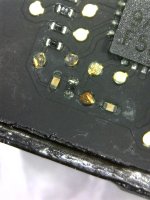
Check this out. Right below pin 9.

Trace contacts look rough. Anything I can do to clean this up?
 

Attachments

  • photo2188.jpg
    photo2188.jpg
    2.4 MB · Views: 3
Back
Top