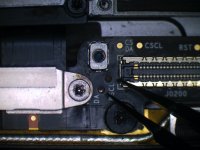
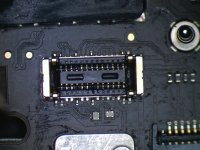
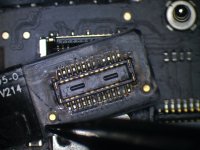
820-01598-A DFU/RECOVERY

2informaticos

Administrator
Staff member
Did you note liquid signs on J6600 connector/flex, or Touch ID?

Do you get any S5, or S3 voltage on the board?

 

mbcontrol

Member
It looks like there is no S3 S5 voltage on the board ...

PP3V3_S5 = 0V
PPVPCORE_S5 = 0V
PP1V8_S5 = 0V

PP1V_S3 = 0V
PP1V2_S3 = 0V

On J6600 connector/flex and Touch ID i can't find any signs of liquid
 

2informaticos

Administrator
Staff member
Did you try to enter DFU as in the tutorial?
 

2informaticos

Administrator
Staff member
I never saw this behavior yet.
Try first revive option; it will preserve SSD information.
If no luck, you may need to try restore; be aware, will erase SSD...
 

mbcontrol

Member
The revive option brings an error ...
(AMRestoreErrorDomain-Fehler 6 - Failed to handle message type StatusMsg (Operation failed)) [AMRestoreErrorDomain – 0x6 (6)]

... restore kills the customer data.
Is there no other chance?
 

2informaticos

Administrator
Staff member
Restore will probably fail, as revive too.
T2, or SSD problems, if DFU can't be done.

Just in case, check if is possible to start in Target Disk mode.
 

mbcontrol

Member
Start in Target Disk mode don't work.
i don't have a lot of experience with ssd problems, can you give me some starting help for troubleshooting
 

mbcontrol

Member
Here are the voltages from the page "ssd support" ...
PP0V9_SSD0 = 0,901V
PPVCCQ_ANI_SSD0 = 1,800V
PP2V5_NAND_SSD0 = 2,520V
SSD0_S4E0_JTAG_TDI = 1,781V
SSD0_S4E1_JTAG_TDO = 1,770V
SSD0_SWDIO = 1,777V
SSD0_SWCLK = 1,783V
SSD0_S4E_JTAG_SEL = 0V
SSD0_S4E_UART_RX = 0,669V
PP1V8_IO_SSD0 = 1,800V
SSD0_S4E3_JTAG_TDO = 0,742V
SSD0_S4E_JTAG_TRST_L = 0V
SSD_BFH = 0V
SSD0_S4E_BOOT2 = 0,002V
SSD0_S4E_UART_TX = 0,770V
SSD0_OCARINA_LPB_L = 0,672V
SSD0_S4E0_UART_TX = 0,753V
SSD0_S4E2_UART_TX = 0,714V
SSD0_S4E1_UART_TX = 0,715V
SSD0_S4E3_UART_TX = 0,735V
SSD0_OCARINA_WP_L = 1,800V
SSD0_WP_L = 1,800V
SSD0_LPB_L = 0,679V
SSD0_RESET_L = 1,800V
SSD0_OCARINA_PFN_L = 1,800V
SSD0_VR_P2V5_EN = 1,800V
 

mbcontrol

Member
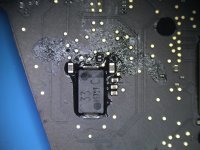
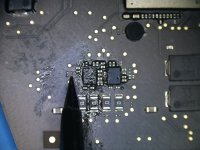
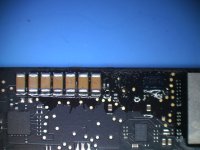
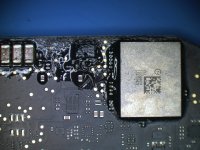
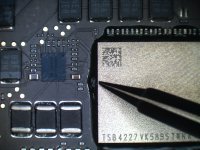
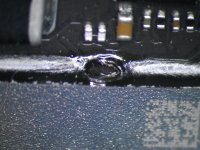
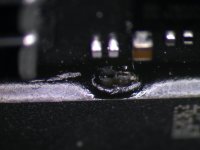
Here are pictures of the damaged areas - after cleaning with flux and heatgun. The filenames tell you the part/area. there are three pictures from u8600 with a hole in the underfill material - is this from the production process or could this be an damage?

area_arround_C9053_after_flux_cleaning.JPGarea_arround_u6400_after_flux_cleaning.JPGarea_backlight_caps_after_flux_cleaning.JPGarea_u3701_u3710_after_flux_cleaning.JPGdisplay_tp_corroded.JPGj5110_con_cleaned.JPGJ5110_flex.JPGu8600_hole_in_underfill_1.JPGu8600_hole_in_underfill_2.JPGu8600_hole_in_underfill_3.JPG
 

mbcontrol

Member
ok so you think this underfill hole at u8600 is from a damage and not from production?

What can i do next? Shall i get rid of the underfill and make a reflow or/and ultrasonic cleaning?
 

2informaticos

Administrator
Staff member
Your board has a damage caused by liquid more than sure; not 100% U8600, can be somewhere else.
You can try to heat all BGA chips with quality flux.
In case need to burn accumulated crap underneath.
If problem is U8600 related, that explains why T2 cannot complete DFU.
 
Top