
-
For $29/mo, we provide access to advanced level technicians who will answer your questions on any Macbook board related matter to the best of their knowledge promptly & walk you through how to solve your problem so you can deliver a working board to your customer.Subscribe Now
You are using an out of date browser. It may not display this or other websites correctly.
You should upgrade or use an alternative browser.
You should upgrade or use an alternative browser.
820-4924-a no power
- Thread starter iClub
- Start date


Do you have 3V3_S5/SUS?
Post PM_PWRBTN_L, PM_RSMRST_L, PM_BATLOW_L, PM_DSW_PWRGD, PCH_DSWVRMEN.
Trigger SMC_ONOFF_L and check for drop pulse at PM_PWRBTN_L.
Post PM_PWRBTN_L, PM_RSMRST_L, PM_BATLOW_L, PM_DSW_PWRGD, PCH_DSWVRMEN.
Trigger SMC_ONOFF_L and check for drop pulse at PM_PWRBTN_L.
"PM_BATLOW_L 0.03V"
Do you have original Magsafe 2 60/85W charger?
Please, do not use capital letters in excess...
Do you have original Magsafe 2 60/85W charger?
Please, do not use capital letters in excess...
Does it charge the battery?
Also trigger SMC_ONOFF_L when battery connected.
Check all RTC signals...
Also trigger SMC_ONOFF_L when battery connected.
Check all RTC signals...

iClub
Member
com a bateria conectada, havia tensão na malha PM_BATLOW_L 3.32V.
RTC: RTC_RESET_L 3,34V; PPVOUT_S0_PCH_DCPRTC 1,69V; PPVRTC_G3H 3,35V; PCH_CLK32K_RTCX1 0,50V; PCH_SRTCRST_L 3,34V;
Eu acho que esses são os sinais do RTC.
the machine turned on with the battery connected unexpectedly, but only with the battery plugged in.
RTC: RTC_RESET_L 3,34V; PPVOUT_S0_PCH_DCPRTC 1,69V; PPVRTC_G3H 3,35V; PCH_CLK32K_RTCX1 0,50V; PCH_SRTCRST_L 3,34V;
Eu acho que esses são os sinais do RTC.
the machine turned on with the battery connected unexpectedly, but only with the battery plugged in.
Last edited:
Check the charger type reported by macOS in System Report...
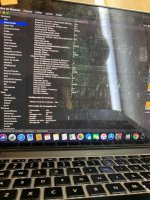
Does it work correctly with battery connected?
Battery is charging?
Battery is charging?
Try disconnecting webcam.
Also try another trackpad board/flex.
Run HWMonitor and see the temps and current sensors.
Also try another trackpad board/flex.
Run HWMonitor and see the temps and current sensors.
Connect the battery, if the board doesn't start other way.
Once logged into macOS, dowsnload and install HWMonitor.
Then run it and check temp values and current sensors.
Once logged into macOS, dowsnload and install HWMonitor.
Then run it and check temp values and current sensors.
iClub
Member
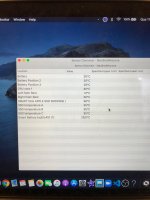
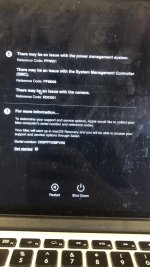
Disconnect webcam and try again...
Maybe this board doesn't want to start without battery.
I know some MacBooks have such behaviour...
Board still slow with battery and webcam connected?
Same camera error reported in diagnistic start up?
In such case, cut off the traces from pins 8/9 of J4002 and try again.
Usually is ALS failure; you could be able to use webcam...
I know some MacBooks have such behaviour...
Board still slow with battery and webcam connected?
Same camera error reported in diagnistic start up?
In such case, cut off the traces from pins 8/9 of J4002 and try again.
Usually is ALS failure; you could be able to use webcam...