
-
For $29/mo, we provide access to advanced level technicians who will answer your questions on any Macbook board related matter to the best of their knowledge promptly & walk you through how to solve your problem so you can deliver a working board to your customer.Subscribe Now
You are using an out of date browser. It may not display this or other websites correctly.
You should upgrade or use an alternative browser.
You should upgrade or use an alternative browser.
A1398 820-3662-a not power
- Thread starter tipoti
- Start date

Wait, do you really talk about U7000, or U7100?
"pim 1: Voltaj yok"
???
Check pin 3 too; sorry that I forgot to mention above.
???
Check pin 3 too; sorry that I forgot to mention above.
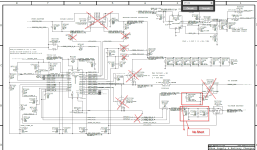
Removing good components will not help you.
Put all back; just be sure to be good.
Check any trace and solder.
Then post again U7100 voltages, above mentioned.
Change all capacitors surrounding U7100, if not sure about them.
Also change U7100, if still overheats.
Just keep out F7140/1.
Put all back; just be sure to be good.
Check any trace and solder.
Then post again U7100 voltages, above mentioned.
Change all capacitors surrounding U7100, if not sure about them.
Also change U7100, if still overheats.
Just keep out F7140/1.
Did you resolder all?
Check/change all components related with pins 21-28.
Check/change all components related with pins 21-28.