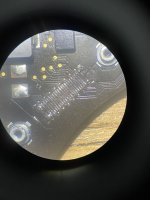
Macbook A1706 820-00239. doesn't see ssd.

ipetro

Member
The MacBook works completely except for the SSD. I replaced the SSD and S3X from the working board but nothing has changed, he still doesn’t see the ssd.
 
lifebot deleted used jumpers
PCH Side===SSD Side
PPBUS_G3H=13.10v=PPVIN_2V7NAND_LB
PP5V_S4=5.13v=PP5V_S4_P2V7NAND_LB
SSD_BOOT_L=1.780v=SSD_BOOT_LB_L
SSD_PWR_EN_L=0.030v=SSD_PWR_EN_LB_L
STORAGE_EN=3.321v=STORAGE_LB_EN
SSD_RESET_L=3.327v=SSD_RESET_LB_L
SSD_CLKREQ_L=0.092v=SSD_PCIE_CLKREQ_LB_L
PCIE_SSD_D2R_P=0v=PCIE_SSD_D2R_LB_P
PCIE_SSD_D2R_N=0v=PCIE_SSD_D2R_LB_N
PCIE_SSD_R2D_C_P=0.690v=PCIE_SSD_R2D_LB_C_P
PCIE_SSD_R2D_C_N=0.695v=PCIE_SSD_R2D_LB_C_N
PCIE_CLK100M_SSD_P=0.432=PCIE_CLK100M_SSD_LB_P
PCIE_CLK100M_SSD_N=0.427v=PCIE_CLK100M_SSD_LB_N
SSD_SR_EN_L=3.195v=LPSR_EN_LB_L
PP3V3_S5=3.351v=PP3V3_S5_SSD_LB
 

Attachments

  • jump.jpeg
    jump.jpeg
    734.6 KB · Views: 5
Last edited:
Any fault history available?

Compare signals voltage with good board.

As last option, you can consider to replace with M2 NVME SSD.
 
The MacBook was erased for sale, but when I tried to install a clean system, the disk was not detected!
I bought an identical board on which the system is installed, but it only works for an external display and I removed the SSD from it without receiving the SSD, I transferred the S3X and still no SSD. Is it possible that the problem is in the Thunderbolt? I only get two 3.3V voltages for a moment and then disappear, but they should stay there, or am I wrong?
TBT_T_CLKREQ_L=3.3v and immediately zero
SSD_PCIE_CLKREQ_LB_L=3.3V and immediately zero
 
Back
Top